

Cette publication est également disponible en :
 Français (French)
How do I create contacts?
Contacts can be created in order to authorize one or more services with another identifier, or to prevent certain services from being authorized (depending on your subscriptions).

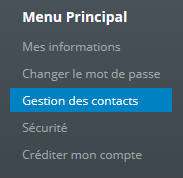
Click on 
Fill in the required fields marked with ” *”.
How do I manage my contacts’ rights?
To manage contact rights, you need to edit the contact or create a new one.
You’ll then have a choice of different privileges for the current contact.
There are rights templates as shown below:

None : Contact cannot access anything
Technical team: The contact will only have access to the services, but will have no control over invoices.
Full Privileges: The contact will have the same access as the administrator account.
Accounting: The contact will only have access to invoices.
Alternatively, you can allow access only to one service:

Clicking on the box with the product name (in bold) automatically activates all the services below. Or you can activate only certain parameters.
After each edit, you need to save the changes.
*NB : If the contact is connected, ask him to reconnect.