

• About Us
  • News
  • Career
  • References
  • Contact
  • +41 (0)22 706 2288
  • English
  • French
CHEOPS TECHNOLOGY SWITZERLAND
  • Cloud and Managed Services
    • Hybrid Cloud
    • Native Cloud
    • Managed Services
    • Managed Security
    • Shared Services
  • Cybersecurity
    • Identification
    • Protection
    • Detection
    • Response
  • Networking and unified communications
    • Telecom operator
    • Networks and wifi
    • Unified communications
  • Technological Modernisation
    • IT Transformation
    • Digital Workplace
    • Consulting
CHEOPS TECHNOLOGY SWITZERLAND
  • About Us
  • Cloud and Managed Services
    • Hybrid Cloud
    • Native Cloud
    • Managed Services
    • Managed Security
    • Shared Services
  • Cybersecurity
    • Identification
    • Protection
    • Detection
  • Networking and unified communications
    • Telecom operator
    • Networks and wifi
    • Unified communications
  • Technological Modernisation
    • IT Transformation
    • Digital Workplace
    • Consulting
  • News
  • Career
  • References
  • Contact us

Windows tips

1
  • Upgrading from Windows 10 to Windows 11

SSL Certificates

7
  • How do I generate a private key from Linux?
  • How do I generate a CSR from Linux?
  • How do I create a plug-in software component in the Microsoft Management Console (MMC)?
  • How can I order an SSL certificate?
  • S/Mime certificate
  • How do I install my SSL certificate with Linux?
  • How do I install my SSL Certificate with cPanel?

DNS

6
  • What DNS entries can be created?
  • Setting up your DNS zone
  • How can I view my DNS propagation?
  • How do I access my Bulk DNS?
  • How can I access my DNS zone from my Web Pro?
  • What do the DNS entries correspond to?

Double authentication

3
  • Onespan sign installation
  • Installing the Microsoft Authentificator client
  • Installing the DUO client

Email

7
  • Zimbra OpenPGP
  • Zimbra Mail Professional V10
  • Zimbra Mail Business V10
  • Problem sending mail to GMAIL
  • Managing Office 365’s Antispam service
  • Exporting emails to a pst file
  • [Office 365] Email encryption in Exchange Online

Customer area

1
  • Cancellation of my services

Web hosting

32
  • What is the format of DNS resource records?
  • Will Cheops manage the Web development of my site?
  • cPanel dedicated Overview
  • SMTP configuration for scripting (PHP or other)
  • How to connect to my Cpanel
  • How do I install WordPress on my hosting?
  • Where can I manage my DNS zone on cPanel?
  • How do I create a subdomain?
  • How do I install my site using SoftAculous?
  • How do I create a Cron Job?
  • How do I import a database?
  • How do I create a permanent HTTP to HTTPS redirect via .htaccess?
  • How to manage an FTP account
  • How do I create a redirect from another domain?
  • How do I manage my add-ons for my PHP version?
  • How can I view my site’s statistics?
  • How to redirect via .htaccess in a subfolder
  • Script to backupper my site
  • What are the different web messages?
  • What are the best practices for securing my site?
  • What PHP versions and modules are available on cPanel?
  • What is the character limit for DNS entries?
  • What is my absolute path on cPanel?
  • Which PHP modules are active on my hosting?
  • Where is my ftp password?
  • How to Backup/Restore my files
  • How do I add an FTP account using an SSH key?
  • How do I configure the FTP client?
  • How do I add an FTP account?
  • How do I change my PHP version for a domain or subdomain?
  • Overview of Professional Web Hosting
  • How do I change my PHP version?

Internet

2
  • How to configure my Zyxel SBG 3300 router
  • How to configure my VMG 8924 router

Antispam

11
  • Understanding your quarantine report
  • How do I manage my quarantine?
  • How do I authorize/block an address or domain?
  • Firewall rules
  • What are Safemail’s MX?
  • How do I change my password?
  • How do I reset my password?
  • How do I access my Safemail console?
  • How to modify my Quarantine report
  • How to manage my list of valid email addresses
  • How do I set up and use two-factor authentication (2FA)?

Telephony

6
  • Using Yealink T42 and T46 phones
  • Scopcomm installation
  • Common problems
  • How to set up an answering machine
  • Using the Yealink W56H phone
  • Configuring your Scopcomm

Veeam

1
  • Veeam Cloud Connect

VPN

3
  • Configuring and connecting SSL VPN with Forticlient
  • Configuring and connecting IPsec VPN with Forticlient
  • FortiClient

Manage my customer area

5
  • Manage my customer area
  • 4. Give access to my services (technical contact)
  • 3. How do I pay my bills?
  • 2. How to manage my account
  • 1. How do I log in to my Cheops Technology (formerly DFI Direct) account?

Our products

2
  • Which product do I need?
  • Information on changes to the configuration of our services

Nextcloud

2
  • Configuring the Nextcloud Windows client
  • Configuring the Nextcloud Mac client

Domain names

11
  • How do I disable the auto-renewal option?
  • How can I find out who owns a domain name?
  • How can I change the registrant for my domain name?
  • How to register a domain name?
  • How do I transfer my domain name to Cheops Technology?
  • How do I renew an expired domain name?
  • How do I retrieve my transfer code?
  • How do I change the nameservers for my dfi-direct domain?
  • What are Cheops Technology’s NS (Name Server)?
  • How do I transfer my domain name to another registrar?
  • How do I Protect-Lock my domain name?
View Categories

How can I view my site’s statistics?

3 minutes de lecture

Cette publication est également disponible en : Français (French)

Your CPanel contains many tools. And like any good administration panel, the “Logs” tab contains a number of statistics tools, as shown in the image below.
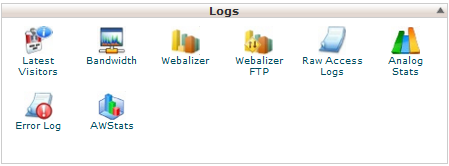
They will enable you to obtain precise statistics about your hosting without having to install external tools.

Note that these statistics are valid for the entire hosting, there are no distinctions between the different domains/subdomains within the hosting. All statistics will be in common!

Module: Last visitors

The last visitor module is quite simple. It lists the last 300 actions requested from servers. It includes IPs, requested files, dates and the agents who made the request.

In the image below, we can see that the “Googlebot” robot has accessed the “/comments/feed/” page.

This is handy for checking the number of files downloaded when requesting a page.

NB: if you don’t see all the fields or wish to remove some, click on the cogwheel and tick the desired fields as shown below.

Module: Bandwidth

This function shows the bandwidth consumed by the site. It shows bandwidth consumption for the current month and total consumption. This includes all HTTP (Web), SMTP, POP3, IMAP and FTP usage.

It can be used to detect any bandwidth “leaks”.

Click on the pie charts for more details.

Module: Webalizer / FTP Webalizer

The Webalizer / FTP Webalizer module is one of the two large statistics modules available on CPanel. It generates a huge amount of statistics on practically everything. The only problem is that you really need to immerse yourself in it to understand and benefit from it.

We recommend that you use , introduced below, which is more “readable”. It does, however, produce some very interesting statistics on the various pages of your site.

A must-see if you’re curious, and a must-adopt if you’re web-savvy!

If you want to generate statistical reports, is the place to go.

Module: Raw access register

Raw access logs let you know who has visited your site, without displaying graphs, curves or anything else.

You can use the Raw Access Logs menu to download a zipped version of the server access log for your site. This can be very useful when you want to quickly see who is visiting your site.

However, before you can obtain these statistics, you’ll need to activate this function if it isn’t already enabled.

You’ll find all the information you get from the “Last visitors” module, but for all connections. There is no limit of 300 actions.

It’s typically these files that are analyzed during hacker attacks on your site, helping to identify sources and entry points on the system. They’re really important.

Module: AWStats

The most accomplished of the panels offered with your hosting, AWStat is a mine of information. Much easier to read than its direct competitor Webalizer, it provides a truly effective analysis of all aspects of your visitors.

You’ll find access times, dates, the most consulted files and anything else your visitors might want to know.

A well-developed menu on the left allows you to refine your search, and you can display statistics for a specific day or for an entire month using the menu tabs.

With all these elements at your disposal, you’ll be able to use these different statistics to adapt the content of your site and become more important!

You’ll also be able to check your SEO and low-content pages.

Now you can make the most of all your hosting resources!

What are your Feelings

How do I manage my add-ons for my PHP version?How to redirect via .htaccess in a subfolder

Chemin des Aulx, 18 - 1228 Plan-les-Ouates

Genève

Tél +41 (0)22 706 2288
Fax +41 (0)22 794 8519

unlimitrust - Route des Flumeaux - 1008 Prilly

Vaud
  • Our Infrastructures
  • DFi-Direct customer access
  • Technical support
  • Webmail
  • Contact
  • GTC
  • Legal information
  • Request for access to your personal data
  • Charter on the confidentiality of personal data
  • Data processing regulations
  • Commitment of Cheops' management
Copyright 1987 – 2024 | CHEOPS TECHNOLOGY SWITZERLAND | Your Swiss partner in Cloud and Cybersecurity
Nous utilisons des cookies sur notre site Web pour vous offrir l'expérience la plus pertinente en mémorisant vos préférences et vos visites répétées. En cliquant sur "Accepter tout", vous consentez à l'utilisation de TOUS les cookies. Cependant, vous pouvez visiter "Paramètres des cookies" pour fournir un consentement contrôlé.
Paramètres des cookiesAccepter toutTout rejeter
Paramètres des cookies

Privacy Overview

This website uses cookies to improve your experience while you navigate through the website. Out of these, the cookies that are categorized as necessary are stored on your browser as they are essential for the working of basic functionalities of the website. We also use third-party cookies that help us analyze and understand how you use this website. These cookies will be stored in your browser only with your consent. You also have the option to opt-out of these cookies. But opting out of some of these cookies may affect your browsing experience.
SAVE & ACCEPT